• Update failed for unipi-kernel-modules-dkms 1.60

    3
    0 Votes
    3 Posts
    985 Views
    J
    @Joerg said in Update failed for unipi-kernel-modules-dkms 1.60: nipi-kernel-modules Hi @Martin-Kudláček , thank you for the quick answer - but after the "apt purge unipi-kernel-modules-dkms" the system did not want to boot anymore, so I decided to do a fresh install as described in README.apt. Best regards Jörg
  • PELV power supply?

    3
    0 Votes
    3 Posts
    939 Views
    B
    @Martin-Kudláček Thanks for your quick reply. Yes, my powers supply and the connection meet PELV standards.
  • Only 2 1-wire sensors are detectable

    2
    0 Votes
    2 Posts
    802 Views
    Martin KudláčekM
    Hello @ArneL, what sensors do you use? Thanks, Martin
  • Neuron vs Gateway with HomeAssistant

    2
    0 Votes
    2 Posts
    811 Views
    Martin KudláčekM
    Hi @honza-muller, both solutions will work. The Gateway + Extensions will allow you to distribute the devices across the building, thus having a "tree with branches" kind of topology. The pure Neuron will result in the "tree" topology, where you will have to have longer cables from the PLC to each device/sensor/switch/light/etc. From SW point of view, there is no difference. The Neuron's however can be purchased with RPI4, so you can have more performance and RAM. Best regards, Martin
  • Modbus TCP (unipitcp) not working on Neuron with Raspberry OS

    2
    0 Votes
    2 Posts
    904 Views
    T
    @noelvaes Did you reboot after the kernel modules were installed?
  • Which kernel to use?

    1
    0 Votes
    1 Posts
    538 Views
    No one has replied
  • Analog Input: difference between AIS and AI?

    3
    0 Votes
    3 Posts
    1k Views
    M
    @Martin-Kudláček Thank you, that clears it up.
  • digital output voltage

    15
    0 Votes
    15 Posts
    3k Views
    Martin KudláčekM
    The problem has been solved by flashing the latest firmware.
  • Energy metering with PRO380-Mod

    5
    0 Votes
    5 Posts
    3k Views
    M
    Hi All, I just got a PRO380 to measure energy from my solar panels from my Neuron device. Since I don't want to run (learn ;-)) NodeRed and there is no turn key solution for native integration of the MOD380 in Evok I searched the internet and found this; https://github.com/volkszaehler/mbmd This spins up a webserver with API and MQTT / InfluxDB integration for different energy meter including the PRO380. Works like a charm for me. Some steps I did; Connect the meter to a RS485 port on the Unipi and enable the dip-switch Make sure that for that particular RS485 port there is no config in /etc/evok.conf (So yes, you need a unused / free port). When I had the port configured in the conf file I did not work, presumably because Evok is intercepting the traffic) Download the pre-compiled binaries from GitHub and extract as documented Perform a scan over modbus to see if your device is found with the command /usr/local/bin/mbmd scan --rtu -v --raw --comset 8E1 -a /dev/ttyNS1 . Note that ttyNS1 is my SECOND port on my device (2.01). Adjust this as needed for your device. My Output was the following (I changed the ID of the PRO380 to 5 on the device: 2020/11/25 09:47:52 config: creating RTU connection for /dev/ttyNS1 (9600baud, 8E1) 2020/11/25 09:47:52 starting bus scan on /dev/ttyNS1 2020/11/25 09:47:56 device 1: n/a 2020/11/25 09:48:00 device 2: n/a 2020/11/25 09:48:04 device 3: n/a 2020/11/25 09:48:08 device 4: n/a 2020/11/25 09:48:10 device 5: INEPRO type device found, VoltageL1: 239.90 Start the webserver with the command /usr/local/bin/mbmd run --rtu --comset 8E1 -a /dev/ttyNS1 -d INEPRO:5 --mqtt-broker tcp://1.1.1.1:1883 --api 0.0.0.0:1380. Also make sure you adjust the ttyNS port numer. As example I included a MQTT broker IP. Please read the docs for further config or InfluxDB integration. Do Note that I redirect the webserver port to 1380 because 8080 is already in use. Go to the IP of your Neuron device on port 1380 and see what happens. I see the information coming up nicely. :-). There are API possibilities too to extract data, or push via MQTT or InfluxDB. If this is what you want to keep, set up a service to start with your device, how to is also in the docs. Perhaps this helps someone. It fairly easy to use. :-)
  • rpi Compute Modul or not

    2
    0 Votes
    2 Posts
    812 Views
    Martin KudláčekM
    Hello @Lebowski, in our PLCs we use the full-version. Best regards, Martin
  • Neuron S103-G - GPRS modem not working

    2
    0 Votes
    2 Posts
    699 Views
    T
    Hello @tmmke, the baudrate and other parameters should be configured as decribed in the product information https://www.unipi.technology/unipi-neuron-s103-g-p107?categoryId=8 If you are using the latest Mervis IDE and Mervis OS 2.3.0, you do not need to worry about the setting the GPIO18, which is done automatically. To send the SMS, you can follow similar tutorial https://kb.unipi.technology/en:sw:01-mervis:sending-sms-hidden GPRS (internet) connectivity is not supported in Mervis and has to be done manually in the Linux as discussed here https://forum.unipi.technology/topic/463/s103-g-use-gsm-gprs-module-to-connect-to-internet/7 Note: The modem cannot send SMS and provide GPRS connectivity at the same time!
  • Replacing custom PLC based home automation with Unipi Neuron?

    1
    0 Votes
    1 Posts
    663 Views
    No one has replied
  • Connection lost Neuron M203 vs Weintek MT8051ip

    3
    2
    0 Votes
    3 Posts
    1k Views
    T
    Hello @John-paul this seems to be related to the Merivs RunTIme Licensing mechanism which has been introduced in the Mervis IDE 2.3.0 and its runtime. Can you please licence your PLC as described on the tutorial https://kb.unipi.technology/en:sw:01-mervis:use-mervis-runtime-licence-hidden
  • L403 Relaygroup 3 not working

    2
    0 Votes
    2 Posts
    751 Views
    Martin KudláčekM
    Hello @juergen, please send the serial number of your L403 to [email protected]. I'll check what firmware you might be running. Thank you and have a nice day, Martin
  • Weintek MT8051ip > Unipi M203

    3
    0 Votes
    3 Posts
    1k Views
    John-paulJ
    Hello Martin, At this moment i got everything working good with BACnet/IP. It is working very fast. All the buttons are (except the dimmer function) connected to the relay outputs, Now i need to programm a dimmer on de M203. I want to use the AO for 1-10 volts to regulate a led dimmer module. I need to find that out, never did that before. Thanks for your help. [image: 0_1586428102030_20200409_112619.jpg]
  • RS485 tty on Neuron S103

    2
    0 Votes
    2 Posts
    958 Views
    Martin KudláčekM
    Hello @roberts_lando, here is a complete list: https://kb.unipi.technology/en:hw:01-axon:portmap Best regards, Martin
  • Neuron and Jablotron alarm interconnect via RS485

    2
    0 Votes
    2 Posts
    1k Views
    A
    Dobrý den, modul JA-121T s UniPi propojit lze. Na straně RS485 máte celkem 4 kontakty, kde D+ je myšleno jako A a D- jako B. Svorky U+, GND jsou určeny pro napájení oddělené části čipu s RS485. Podle letáku JA-121T (zde) lze zjistit, že napětí mezi svorkami U+ a GND může být v rozsahu 6-28 VDC, můžete proto použít napájení 24 VDC určené pro jednotku Unipi. Spotřeba je 15mA. Pokud chcete použít kabel se stíněním, uzemněte jej na straně PLC. Modul JA-121T není modbus zařízení a proto zatím není integrován v Mervis IDE. Na vývoji se pracuje. Obr. k popisu zapojení [image: 0_1578411561423_Screenshot_1.png] S pozdravem Antonín Všetula
  • Nastavení Modbus serial pro elektroměr EM 340

    8
    4
    0 Votes
    8 Posts
    4k Views
    Trnda83T
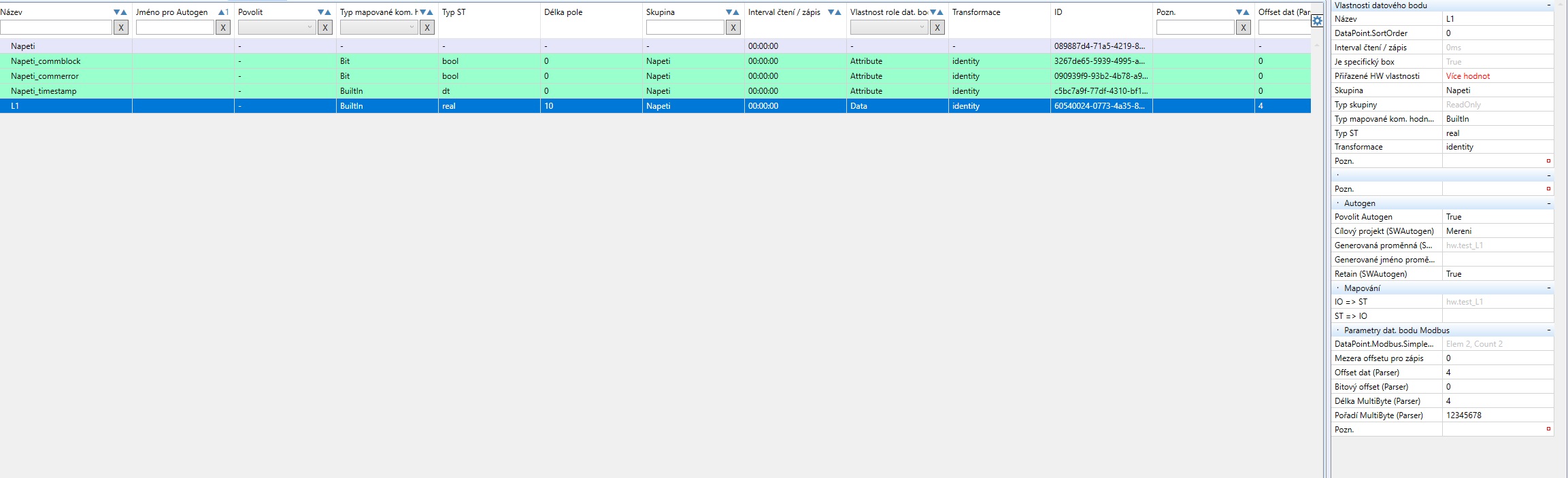
    Zdravím ve spolek ;) Aktuálně jsem se zabýval komunikací elektroměru EM 340, která mě také trochu potrápila, ale nakonec je vše funkční. Zásadním problémem je pořadí bytů! Není 12345678 jak je uvedeno v ilustracích této diskuse výše. Pořadí MultiByte (Parser) je 3412. Přikládám několik obrázků jako stručný návod pro nastavení. Ve stejném smyslu lze nastavit vyčítání ostatních proměnných. Vyčítané proměnné z EM340: [image: 0_1576165375445_EM340_04.PNG] Nastavení skupiny - Read_VAL (počáteční prvek a počet): [image: 0_1576165478762_EM340_01.PNG] Nastavení prvku - L1_A: [image: 0_1576165566196_EM340_02.PNG] Nastavení prvku - L1_W: [image: 0_1576165701421_EM340_03.PNG]
  • 1-WIRE teplotny senzor sa prehrieva

    3
    0 Votes
    3 Posts
    1k Views
    D
    Dobry den, je to tak ako uvadzate, problem sa prejavuje odvtedy, ako sme zacali PLC ovladat stykace ktorymi ovladame elektricke vykurovanie celeho domu a kvoli tomu sme natiahli v blizkosti teplomeru viacere vodice, cez ktore v spicke prechadza aj 14kW. Dakujem za rychlu odpoved a navrhnute riesenie, ktore nam pomohlo.
  • Relé vs. tranzistor - životnost

    2
    1
    0 Votes
    2 Posts
    1k Views
    Martin KudláčekM
    Dobrý den @lukasvitek911, relé jsou Fujitsu F3AA024E, zde je výtah z datasheetu: [image: 0_1574946013539_b7d56910-df7a-4123-8f9d-179284d854bf-image.png] DO jsou na většině jednotkách a vždy v počtu 4 kusů. Jsou typu NPN, tedy na jejich výstupu není 24V. Spíše bych Vám doporučil poohlédnout se po nějakém Modbus rozšíření, který má patřičný počet PNP výstupů. S pozdravem, Martin