• This topic is deleted!

    1
    3
    0 Votes
    1 Posts
    52 Views
    No one has replied
  • Pomoc s API a DB

    7
    0 Votes
    7 Posts
    3k Views
    B
    Vše vyřešeno pomocí Weintek cMT-SVR-100. Vyčítám data do své SQL databáze. Problém s časovou značkou vyřešen pomocí vlastní značky v SQL databázi. Chápu, že jiní by to dali lépe a levněji, ale bohužel já programovat neumím.
  • Data z kalorimetru Megatron2

    2
    0 Votes
    2 Posts
    2k Views
    V
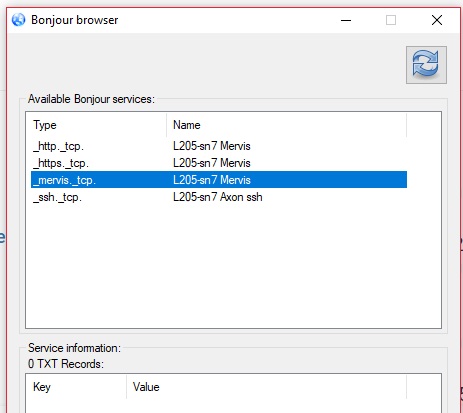
    Trochu to upřesním. Jde mi o to, kde se dá upravit dotaz který posílá Axon do kalorimetru. [image: 0_1543869821320_mbusmervis.jpg]
  • Boot project

    4
    0 Votes
    4 Posts
    2k Views
    Martin KudláčekM
    Dobrý den, je nám líto, ale podporu pro Mervis poskytujeme pouze k našim produktům. Děkuji za pochopení a přeji pěkný zbytek dne, Martin Kudláček
  • Error in FBD

    2
    1
    0 Votes
    2 Posts
    2k Views
    T
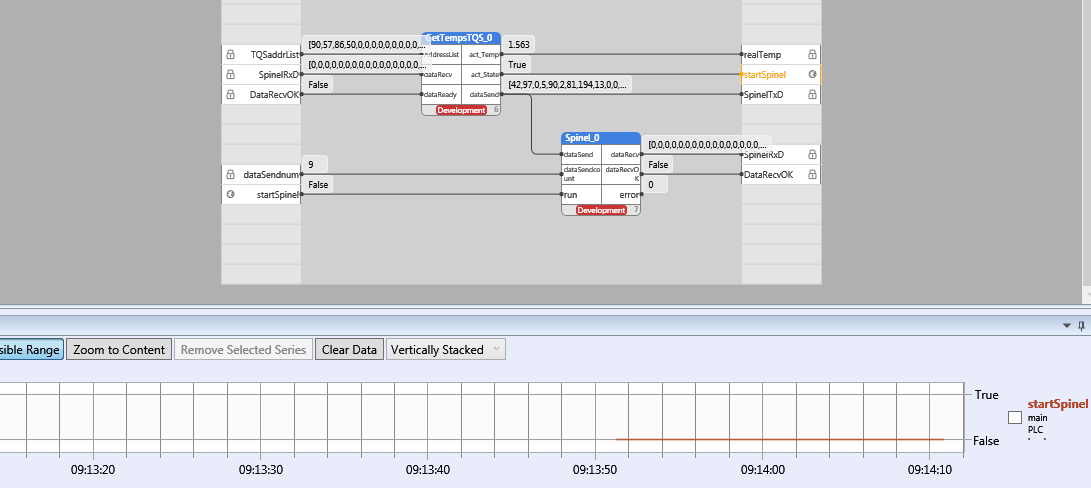
    @derinex This is a behavior from the design of the Runtime. Inputs are read at the start of the cycle, outputs are sent at the end of the cycle. Connect the output act_State to the input run directly.
  • How to set CONTROLLERTYPE to heating

    2
    0 Votes
    2 Posts
    2k Views
    Martin KudláčekM
    Hello @arolli, this is described in the Mervis help files (F1). Look for "B31" and you will see that the input parameter is type "CONTROLLERTYPE" with a hint how to use it. Best regards, Martin
  • This topic is deleted!

    1
    0 Votes
    1 Posts
    2 Views
    No one has replied
  • modbus RTU over TCP

    4
    0 Votes
    4 Posts
    2k Views
    L
    Hi So it was information noise on the side of the papouch support. ;-) It's really a modbus TCP and it works. I apologize for misinformation.
  • "Target controller is running old runtime, update is required" error

    3
    0 Votes
    3 Posts
    2k Views
    F
    Thanks a lot. It works. I imagine that flashing SD card wasn't usefull! ;-) Regards.
  • HMI definice dotaz

    3
    0 Votes
    3 Posts
    2k Views
    L
    Dobry den Dekuji za nasmerovani, me zmatlo to ze v dokumentaci je popisovana "Nova" verze mervisu.
  • Elektroměr - FUPLA blok

    3
    0 Votes
    3 Posts
    2k Views
    B
    Dobrý den, děkuji za info. Tedy ale pokud budu chtít, aby mně z globální proměné řekněme aktuální spotřeby vycházel výsledek řekněme denní spotřeby je třeba na to vytvořit vlastní FB.
  • Missing transformation ds2408_sh_trans

    3
    0 Votes
    3 Posts
    2k Views
    G
    Thanks, that was it. I seen that file in old Mervis, but thought that it is older version of Lib.UniPi, but also was blind and don't see it in on download page. Thank you very much, now it works.
  • Mervis 74371 - Analog Out Inverted?

    2
    1
    0 Votes
    2 Posts
    1k Views
    T
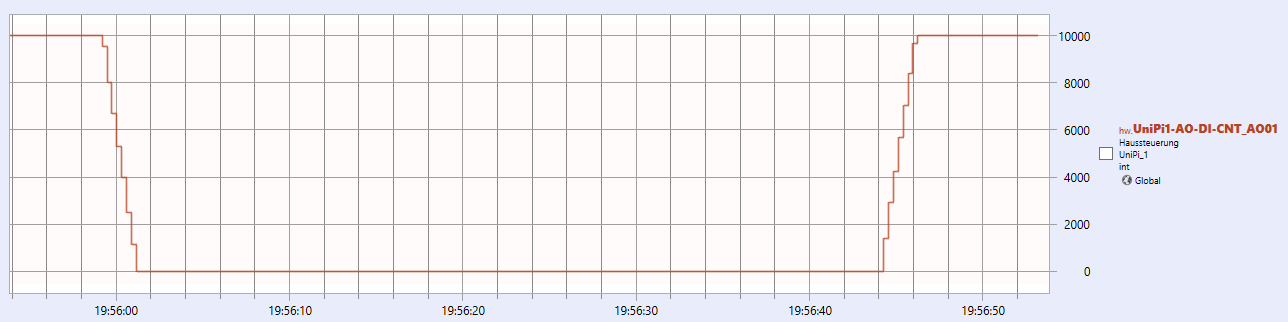
    @ckb the inverse behavior of AO was a bug and is now fixed. Since 0 is a default value, most users do not want a default 10V after startup of the application. You would have to smoothen it in the SW - create your own function block which will add/deduct automatically every a part of the difference |current_voltage-target_voltage| every cycle(or every 0.1s). But honestly, this most probably will also cause visible steps in the dimming process.
  • undefined code from io.getportstatus(handle)

    3
    0 Votes
    3 Posts
    2k Views
    Martin KudláčekM
    Hello @derinex, sorry for the communication silence. Here is the complete list of errors: OperationStatus_Ok = 0, OperationStatus_NoSuchVariable = 1, OperationStatus_WriteFailed = 2, OperationStatus_SizeMismatch = 3, OperationStatus_Unspecified = 4, OperationStatus_Denied = 5, OperationStatus_InvalidState = 6, OperationStatus_FailedToLoadVmImage = 7, OperationStatus_EmailQueueFull = 8, OperationStatus_ToAddrTooLong = 9, OperationStatus_FromAddrTooLong = 10, OperationStatus_SubjectTooLong = 11, OperationStatus_MessageTooLong = 12, OperationStatus_ServerTooLong = 13, OperationStatus_AuthNameTooLong = 14, OperationStatus_AuthPasswordTooLong = 15, OperationStatus_UnknownChannel = 16, OperationStatus_UnknownSrcEncoding = 17, OperationStatus_UnknownDestEncoding = 18, OperationStatus_ConversionFailed = 19, OperationStatus_ConversionSourceIllegal = 20, OperationStatus_ConversionSourceExhausted = 21, OperationStatus_ConversionDestExhausted = 22, OperationStatus_Connected = 23, OperationStatus_InvalidParameter = 24, OperationStatus_NotOpened = 25, OperationStatus_Timeout = 26, OperationStatus_UnknownCommand = 27, OperationStatus_ConnectionFailed = 69, OperationStatus_ConnectionReset = 72, OperationStatus_NotConnected = 73, OperationStatus_InvalidImageVersion = 28, OperationStatus_InvalidEndian = 29, OperationStatus_ImageMarkedAsInvalid = 30, OperationStatus_Empty = 31, OperationStatus_Overlapp = 32, OperationStatus_Retry = 33, OperationStatus_Busy = 34, OperationStatus_PortAlreadyUsed = 35, OperationStatus_WrongGuid = 36, OperationStatus_InvalidCrc = 37, OperationStatus_InvalidStackType = 38, OperationStatus_NoSuchTask = 39, OperationStatus_OutOfRange = 40, OperationStatus_GsmError = 41, OperationStatus_GsmReady = 42, OperationStatus_GsmWaitingPin = 43, OperationStatus_GsmWaitingPuk = 44, OperationStatus_GsmWrongPin = 45, OperationStatus_GsmPrompt = 46, OperationStatus_QueueFull = 47, OperationStatus_Truncated = 48, OperationStatus_UnknownDriver = 49, OperationStatus_UnbalancedParenthesis = 50, OperationStatus_InvalidClass = 51, OperationStatus_NoMemory = 52, OperationStatus_FileNotFound = 53, OperationStatus_Running = 54, OperationStatus_Stopped = 55, OperationStatus_NoSuchMetadata = 56, OperationStatus_BusError = 57, OperationStatus_NvRamNotAvailable = 58, OperationStatus_ConfigurationFailed = 59, OperationStatus_PortMapInvalid = 60, OperationStatus_NoSuchDevice = 61, OperationStatus_SameValue = 62, OperationStatus_OutOfSync = 63, OperationStatus_Async = 64, OperationStatus_NotLicensed = 65, OperationStatus_LicenseExpired = 66, OperationStatus_Signaled = 67, OperationStatus_Crashed = 68, OperationStatus_NoSuchObject = 70, OperationStatus_NotIndexable = 71, OperationStatus_NoSuchItem = 74 Both states (31 and 34) are correct right after when you send the data. The need to reboot of the PLC afterwards doesn't seem to by tied to this. Can you please share the code with us? You can send it to [email protected]. Thanks! Martin
  • New Neuron FW v.1.7Beta

    3
    0 Votes
    3 Posts
    2k Views
    A
    Hi Martin I follow the suggestion to set autogen only on needed variables (just DI and DO_w). I solved the issue. thanks Antonio
  • P controller - Cooling to AO 1-10V

    2
    0 Votes
    2 Posts
    1k Views
    Martin KudláčekM
    Hello @joe160781, can you please share a project with us? You can send it to [email protected]. Thanks, Martin
  • Mervis IDE & OS update

    2
    0 Votes
    2 Posts
    2k Views
    T
    Hello @arolli, just briefly, please check https://kb.unipi.technology/en:sw:01-mervis:moving_from_2.0_to_2.1-hidden 1 - You should find question in the knowledge base 2 - You can have multiple instances of Mervis IDE installed on the same time on your PC. Mervis will ask you which version you wish to use on startup. 3 - You should find question in the knowledge base 4 - Yes
  • Access variables from Neuron (MervisOS)

    3
    0 Votes
    3 Posts
    2k Views
    S
    Thank you for the wonderfull answer Martin! Currently the RaspberryPi only has the SD card as memory space indeed, but it would be possible to attach an external drive. After creating the Modbus Server Channel, I was instantly able to view all the values that I wanted. Now I can experiment with how we want to store our data. But first we're going to see if we can attach it to the internet so we can use the MervisDB. Thanks for the info!
  • Mervis OS Login Credentials

    7
    0 Votes
    7 Posts
    4k Views
    Martin KudláčekM
    Hello @phil, @StevenHendrickx to login to the MervisOS command line via SSH, you need to enable the SSH first. This behaviour changed in the image 1.7, where the SSH is disabled by default as a security measure. In older images, the SSH was enabled. To enable the SSH, you need to create file named "ssh.txt" in the partition called "boot" on your SD card. This is the same process as with Raspbian. You cannot enable the SSH once the UniPi is running. You need to take out the SD card, put it in your PC a create the file there. The default username is "unipi" and password is "unipi.technology". To switch to the "root" user, run sudo bash. Is this description sufficient or do you need to clarify it a bit more? Best regards, Martin
  • [newbie] push buttons and relay statuses

    5
    0 Votes
    5 Posts
    3k Views
    A
    Thanks @tomas_hora it works as expected.