Hello @derinex,
sorry for the communication silence. Here is the complete list of errors:
OperationStatus_Ok = 0,
OperationStatus_NoSuchVariable = 1,
OperationStatus_WriteFailed = 2,
OperationStatus_SizeMismatch = 3,
OperationStatus_Unspecified = 4,
OperationStatus_Denied = 5,
OperationStatus_InvalidState = 6,
OperationStatus_FailedToLoadVmImage = 7,
OperationStatus_EmailQueueFull = 8,
OperationStatus_ToAddrTooLong = 9,
OperationStatus_FromAddrTooLong = 10,
OperationStatus_SubjectTooLong = 11,
OperationStatus_MessageTooLong = 12,
OperationStatus_ServerTooLong = 13,
OperationStatus_AuthNameTooLong = 14,
OperationStatus_AuthPasswordTooLong = 15,
OperationStatus_UnknownChannel = 16,
OperationStatus_UnknownSrcEncoding = 17,
OperationStatus_UnknownDestEncoding = 18,
OperationStatus_ConversionFailed = 19,
OperationStatus_ConversionSourceIllegal = 20,
OperationStatus_ConversionSourceExhausted = 21,
OperationStatus_ConversionDestExhausted = 22,
OperationStatus_Connected = 23,
OperationStatus_InvalidParameter = 24,
OperationStatus_NotOpened = 25,
OperationStatus_Timeout = 26,
OperationStatus_UnknownCommand = 27,
OperationStatus_ConnectionFailed = 69,
OperationStatus_ConnectionReset = 72,
OperationStatus_NotConnected = 73,
OperationStatus_InvalidImageVersion = 28,
OperationStatus_InvalidEndian = 29,
OperationStatus_ImageMarkedAsInvalid = 30,
OperationStatus_Empty = 31,
OperationStatus_Overlapp = 32,
OperationStatus_Retry = 33,
OperationStatus_Busy = 34,
OperationStatus_PortAlreadyUsed = 35,
OperationStatus_WrongGuid = 36,
OperationStatus_InvalidCrc = 37,
OperationStatus_InvalidStackType = 38,
OperationStatus_NoSuchTask = 39,
OperationStatus_OutOfRange = 40,
OperationStatus_GsmError = 41,
OperationStatus_GsmReady = 42,
OperationStatus_GsmWaitingPin = 43,
OperationStatus_GsmWaitingPuk = 44,
OperationStatus_GsmWrongPin = 45,
OperationStatus_GsmPrompt = 46,
OperationStatus_QueueFull = 47,
OperationStatus_Truncated = 48,
OperationStatus_UnknownDriver = 49,
OperationStatus_UnbalancedParenthesis = 50,
OperationStatus_InvalidClass = 51,
OperationStatus_NoMemory = 52,
OperationStatus_FileNotFound = 53,
OperationStatus_Running = 54,
OperationStatus_Stopped = 55,
OperationStatus_NoSuchMetadata = 56,
OperationStatus_BusError = 57,
OperationStatus_NvRamNotAvailable = 58,
OperationStatus_ConfigurationFailed = 59,
OperationStatus_PortMapInvalid = 60,
OperationStatus_NoSuchDevice = 61,
OperationStatus_SameValue = 62,
OperationStatus_OutOfSync = 63,
OperationStatus_Async = 64,
OperationStatus_NotLicensed = 65,
OperationStatus_LicenseExpired = 66,
OperationStatus_Signaled = 67,
OperationStatus_Crashed = 68,
OperationStatus_NoSuchObject = 70,
OperationStatus_NotIndexable = 71,
OperationStatus_NoSuchItem = 74
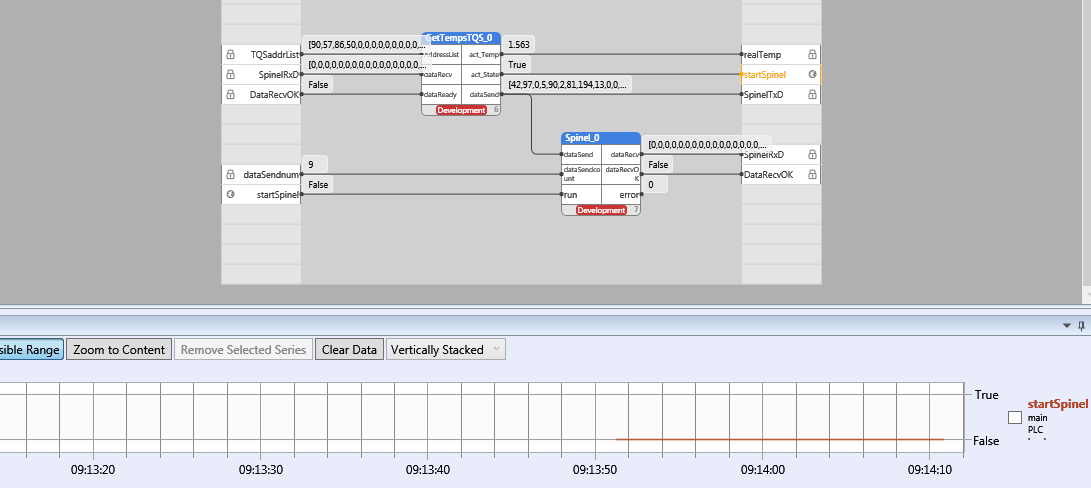
Both states (31 and 34) are correct right after when you send the data. The need to reboot of the PLC afterwards doesn't seem to by tied to this. Can you please share the code with us? You can send it to
[email protected].
Thanks!
Martin