• Categories
    • Recent
    • Tags
    • Popular
    • Users
    • Groups
    • Search
    • Register
    • Login

    Push button relay toggle

    Scheduled Pinned Locked Moved Mervis
    mervisneuronswitch
    25 Posts 10 Posters 20.0k Views 1 Watching
    Loading More Posts
    • Oldest to Newest
    • Newest to Oldest
    • Most Votes
    Reply
    • Reply as topic
    Log in to reply
    This topic has been deleted. Only users with topic management privileges can see it.
    • R
      RainerK
      last edited by

      Hi @all,

      I tried to solve the problem by using "Event triggered tasks" maybe @tomas_hora could explain how it could be done this way.

      BR Rainer

      1 Reply Last reply
      Reply Quote 0
      • G
        Giamba
        last edited by Giamba

        Hi,
        With the following program, If I "short" push the button, the final out value goes 0 or previous analog value. If I "long" push the button the value increase or decrease.
        So I have short and long push detection and a toggled output.
        This is working pretty well with 50% ratio.
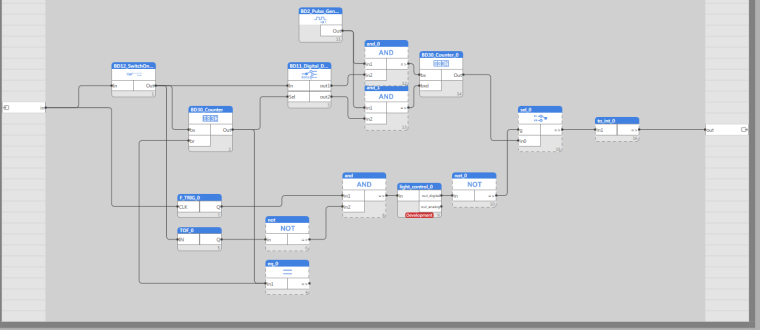
        0_1499688602224_Long push dimmer.png

        John-paulJ 2 Replies Last reply
        Reply Quote 0
        • G
          Giamba
          last edited by

          Hi again,
          This is my On/Off switch (allways as a fonction block in fdb mode):
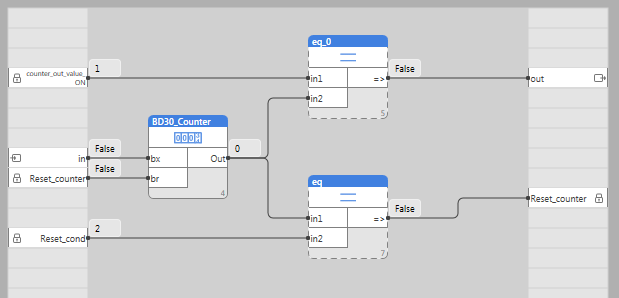
          0_1499690120888_ON_OFF_SWITCH.png

          1 Reply Last reply
          Reply Quote 0
          • K
            kolopes
            last edited by

            Hi,
            I have 3 buttons that I want to turn on / off the bulb. (push - lights up, push light off)
            How best to solve.
            thank you for the advice

            T 1 Reply Last reply
            Reply Quote 0
            • T
              tomas_hora administrators @kolopes
              last edited by

              @kolopes The asnwer is above. The best is to use the DirectSwitch function (set variables DS_enable and DS_toggle to True). The number of DI(button) must be the same as RO. You can enable this functionality for each pair of DI-Ro/Do. Make sure to set the NV_save variable of the group where this will be configured to True and False afterwards.

              To be able to set the values, you have to be in debug mode!

              Alternative approach is to write your own function block that might do much more...

              1 Reply Last reply
              Reply Quote 0
              • S
                sgtgarcia
                last edited by

                Hi
                Where can i find the "Direct Switch" function?
                Are there some more library files i can download somewhere?

                I am new to mervis and I'am no programmer.
                The programs above seem complicated.

                In the logo software there is a block especially for this purpose.
                It als has an global off function.
                That is the kind of thing I need.

                T 1 Reply Last reply
                Reply Quote 0
                • T
                  tomas_hora administrators @sgtgarcia
                  last edited by

                  @sgtgarcia Direct Switch is a feature of HW of Neuron, it's not a feature of Mervis (but it can be of course programmed for such behaviour). To enable DS, check Mervis variables that start with "DS_" there you will find the DS_enable, DS_toggle and DS_polarity functions.

                  1 Reply Last reply
                  Reply Quote 0
                  • M
                    msoenen
                    last edited by

                    Hello I would like to activate direct switch, but I can not find how. could you explain?

                    T 1 Reply Last reply
                    Reply Quote 0
                    • T
                      tomas_hora administrators @msoenen
                      last edited by

                      @msoenen https://kb.unipi.technology/en:sw:01-mervis:advanced-modes-of-digital-inputs-hidden#direct_switch

                      1 Reply Last reply
                      Reply Quote 0
                      • M
                        msoenen
                        last edited by

                        Hello, thank you a works, but is it possible to use a 'RO' output with a 'DI' direct switch and another DI or function
                        thank you

                        1 Reply Last reply
                        Reply Quote 0
                        • T
                          tomas_hora administrators
                          last edited by

                          Right now, you can only link a DiX.Y and DO/ROX.Y - X and Y has to be the same with both DO/RO and DI.

                          1 Reply Last reply
                          Reply Quote 0
                          • M
                            msoenen
                            last edited by

                            Thank you for the answer, but for my home automation project, I wanted to

                            activate my lamps with pushbuttons ( this OK) and a button to disable all RO at the same time

                            how to do?

                            T 1 Reply Last reply
                            Reply Quote 0
                            • T
                              tomas_hora administrators @msoenen
                              last edited by

                              @msoenen Then check the "DirectSwitch_force" and its documentation which is part of Lib.UniPi

                              M 1 Reply Last reply
                              Reply Quote 0
                              • M
                                msoenen @tomas_hora
                                last edited by

                                @tomas_hora Hello, this is the function I'm looking for, but I do not really understand how to do the program in input. would you have an example of a program with this function?
                                thank you in advance

                                T 1 Reply Last reply
                                Reply Quote 0
                                • T
                                  tomas_hora administrators @msoenen
                                  last edited by

                                  @msoenen Just the picture in the help of Mervis.. There is actually not much to show.

                                  1 Reply Last reply
                                  Reply Quote 0
                                  • M
                                    msoenen
                                    last edited by

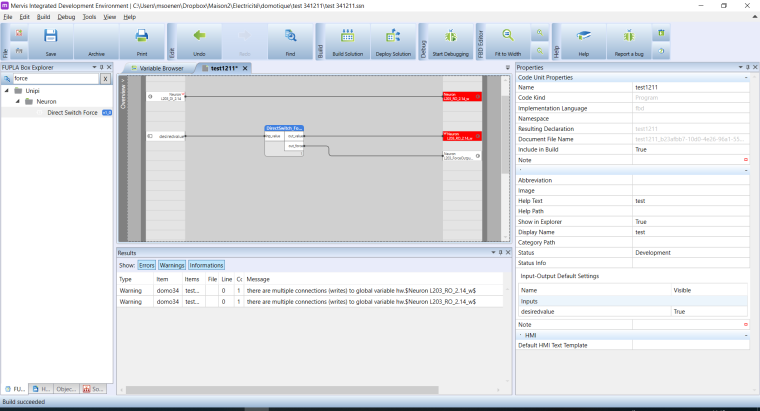
                                    0_1542708886962_51727d06-1f8e-42fc-a722-bdae974095ca-image.png

                                    Hello sorry, I am beginner on unipi.
                                    when I do exactly like help, it does not work, it must miss a configuration
                                    Thank you for your help

                                    T 1 Reply Last reply
                                    Reply Quote 0
                                    • T
                                      tomas_hora administrators @msoenen
                                      last edited by

                                      @msoenen first of all get rid of the warining by removing the first connection, assigning to one variable multiple times in fupla is not allowed

                                      1 Reply Last reply
                                      Reply Quote 0
                                      • G
                                        Giamba
                                        last edited by

                                        0_1545042847414_mervis.png

                                        Martin KudláčekM 1 Reply Last reply
                                        Reply Quote 0
                                        • Martin KudláčekM
                                          Martin Kudláček @Giamba
                                          last edited by

                                          Hello @giamba ,
                                          please do a proper screenshot of whole window, so we can see the error results. There are probably different variable types, but it is impossible to tell from the cut out.

                                          Thank you,
                                          Martin

                                          1 Reply Last reply
                                          Reply Quote 0
                                          • John-paulJ
                                            John-paul @Giamba
                                            last edited by

                                            Hello @Giamba , i was trying to use your dimmer program to to get a 0-10v output on my M203. I'm pretty sure i excactly copied your programm but not the results as you descripe. First of all, it will anly switch between 0 an 10V. no dimming function. Second problem is that i cannot connect the eq_0 / in1 to the BD30 counter to the br. Wont accept. maybe i made a misgtake but i cannot get it. Is it also possible to send me the parameters you use for the components in your programm? Many regards John-paul

                                            1 Reply Last reply
                                            Reply Quote 0

                                            Hello! It looks like you're interested in this conversation, but you don't have an account yet.

                                            Getting fed up of having to scroll through the same posts each visit? When you register for an account, you'll always come back to exactly where you were before, and choose to be notified of new replies (either via email, or push notification). You'll also be able to save bookmarks and upvote posts to show your appreciation to other community members.

                                            With your input, this post could be even better 💗

                                            Register Login
                                            • First post
                                              Last post