• Categories
    • Recent
    • Tags
    • Popular
    • Users
    • Groups
    • Search
    • Register
    • Login

    Access to variables from another PLC

    Scheduled Pinned Locked Moved Mervis
    24 Posts 4 Posters 15.5k Views 1 Watching
    Loading More Posts
    • Oldest to Newest
    • Newest to Oldest
    • Most Votes
    Reply
    • Reply as topic
    Log in to reply
    This topic has been deleted. Only users with topic management privileges can see it.
    • C
      CKB
      last edited by

      I want to share data between two UniPi with Mervis. Currently I try an approach with coms over SSCP described in the Mervis IDE Help (when searching with the title of this topic).
      I followed the decription, but during the build it throws an error for an incorrect connection type for both PLCs.
      I cannot find the fault... Did anyone try this before?

      Thanks & Regards
      CB

      T 1 Reply Last reply
      Reply Quote 0
      • T
        tomas_hora administrators @CKB
        last edited by

        @CKB Can you share your project?

        C 1 Reply Last reply
        Reply Quote 0
        • C
          CKB
          last edited by

          This post is deleted!
          1 Reply Last reply
          Reply Quote 0
          • C
            CKB @tomas_hora
            last edited by

            @tomas_hora

            Sure, to which email adress shall I send the snn file?
            Think the fault must be somewhere at the TCP settings...

            T 1 Reply Last reply
            Reply Quote 0
            • T
              tomas_hora administrators @CKB
              last edited by

              @CKB Send me a link to download the project to a PM

              C 1 Reply Last reply
              Reply Quote 0
              • C
                CKB @tomas_hora
                last edited by

                @tomas_hora I sent you a download link for wetransfer in the chat

                1 Reply Last reply
                Reply Quote 0
                • C
                  CKB
                  last edited by

                  I tried it again with the newer runtime, also adjusted the IP setting and simplified the program to an unidirectional communication from PLC2 to PLC1.
                  The result is: no longer error messages, only fault is that the variable (fromUniPi2) at PLC1 which I want to change via PLC2 is now marked in red. I declared it in the Globals, with and without any namespace but no success. Is there a trick/another fault?
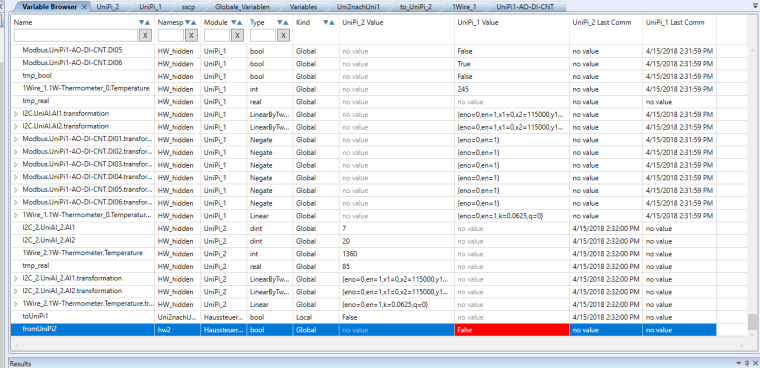
                  0_1523796262912_upload-069394ea-a155-443e-aec0-e9f669828709

                  Thx
                  CB

                  1 Reply Last reply
                  Reply Quote 0
                  • G
                    Giamba
                    last edited by Giamba

                    hi @CKB, @tomas_hora ,
                    Same problem for me, did you find the solution ?
                    Thanks.

                    1 Reply Last reply
                    Reply Quote 0
                    • G
                      Giamba
                      last edited by Giamba

                      Hi,
                      I test lots of configurations and doesn't work yet.
                      This is what I have in mervis:
                      !0_1525599211705_Mervis com.JPG
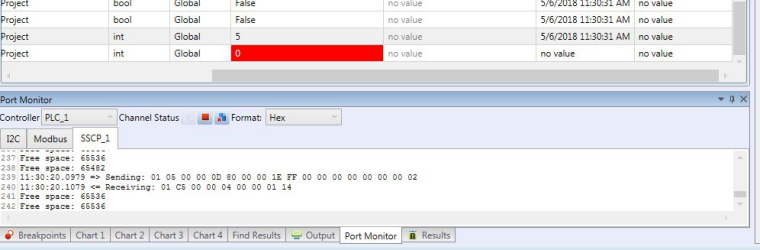
                      And netstat command:
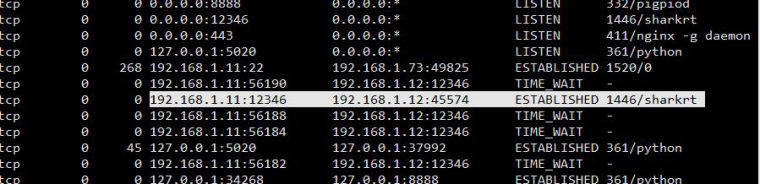
                      0_1525599296587_tcp connexion.JPG
                      So, plz, can U tell me what's wrong ?

                      1 Reply Last reply
                      Reply Quote 0
                      • G
                        Giamba
                        last edited by

                        As seen in https://kb.mervis.info/lib/exe/fetch.php/cs:mervis-ide:sharkprotocolspecification_user_2017_05_30.pdf,
                        In port monitor:
                        On receiving:

                        • 01 SSCP address
                        • C5 00 Read variables directly error
                        • 00 04 Data length
                        • 00 00 01 14 NotLogged

                        So I have a resonse, credentials seems too be wrong, but I have admin - rw on PLC configuration and SSCP Device.
                        Do you have an explanation ?

                        1 Reply Last reply
                        Reply Quote 0
                        • G
                          Giamba
                          last edited by

                          Up @tomas_hora

                          1 Reply Last reply
                          Reply Quote 0
                          • C
                            CKB
                            last edited by CKB

                            I read the same information in my port monitor
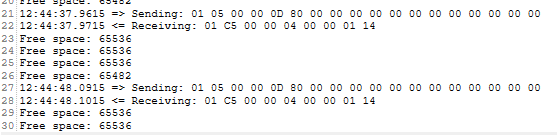
                            0_1525862822076_upload-e0197090-947e-4378-8228-6aed04a8d5a8

                            only option I see is to check the ports at the router. In Cisco forums they mention to open TCP port 2000, so will try this later on.

                            system status says for both sscp channels:

                            0_1525866041448_upload-5543c48f-f2d4-4a40-9a5b-557058b435cc
                            0_1525866056796_upload-6ceeea3e-65d1-48c6-8205-4ec5047cb42e

                            I cannot find the problem

                            1 Reply Last reply
                            Reply Quote 0
                            • G
                              Giamba
                              last edited by

                              Hi, this is the SSCP Server log. Can U tell me how is managed the login on the RT (maybe cookie with wrong acl) and if the sscp connection have to be permanant keep-alive because it seems to reconnect on each request.

                              [10.05 09:16:44.863]      TSvr12346: New connection on port 12346 (remote 192.168.1.55:48494)
                              [10.05 09:16:44.883] <->  TSvr12346: Assigned client context no. 0
                              [10.05 09:16:46.909] <->  TSvr12346: Unassigned client context no. 0
                              [10.05 09:16:46.914]      TSvr12346: New connection on port 12346 (remote 192.168.1.55:48496)
                              [10.05 09:16:46.919] <->  TSvr12346: Assigned client context no. 0
                              [10.05 09:16:48.959] <->  TSvr12346: Unassigned client context no. 0
                              [10.05 09:16:48.965]      TSvr12346: New connection on port 12346 (remote 192.168.1.55:48498)
                              [10.05 09:16:48.970] <->  TSvr12346: Assigned client context no. 0
                              [10.05 09:16:51.010] <->  TSvr12346: Unassigned client context no. 0
                              [10.05 09:16:51.015]      TSvr12346: New connection on port 12346 (remote 192.168.1.55:48500)
                              [10.05 09:16:51.020] <->  TSvr12346: Assigned client context no. 0
                              [10.05 09:16:53.060] <->  TSvr12346: Unassigned client context no. 0
                              [10.05 09:16:53.066]      TSvr12346: New connection on port 12346 (remote 192.168.1.55:48502)
                              [10.05 09:16:53.085] <->  TSvr12346: Assigned client context no. 0
                              [10.05 09:16:55.111] <->  TSvr12346: Unassigned client context no. 0
                              [10.05 09:16:55.116]      TSvr12346: New connection on port 12346 (remote 192.168.1.55:48504)
                              [10.05 09:16:55.121] <->  TSvr12346: Assigned client context no. 0
                              
                              T 1 Reply Last reply
                              Reply Quote 0
                              • T
                                tomas_hora administrators @Giamba
                                last edited by

                                @CKB this is caused by a bug in the Mervis RunTime, which should have been fixed in the IDE I sent you, but unfortunately not :( We expect to make an official release within a few weeks where this issue is fixed for sure - tested today with @Giamba (THX!) If anyone has the same issue, I can send a pre-release of the new IDE, but I cannot guarantee 100% functionality since not all features have been tested - but the SSCP is fixed.

                                1 Reply Last reply
                                Reply Quote 0
                                • C
                                  CKB
                                  last edited by

                                  Hi Tomas, can you share the pre-released IDE with the fixed SSCP please?

                                  1 Reply Last reply
                                  Reply Quote 0
                                  • C
                                    CKB
                                    last edited by

                                    Hi, did it work for Giamba? It still doesn't work for me even with the new IDE.. :/

                                    1 Reply Last reply
                                    Reply Quote 0
                                    • G
                                      Giamba
                                      last edited by

                                      Hi CKB.
                                      Yes it's ok for me now. Tested with example and with my project.

                                      1 Reply Last reply
                                      Reply Quote 0
                                      • C
                                        CKB
                                        last edited by

                                        Hi Tomas, just FYI - Giamba was so nice to help me in a short teamviewer session. It works now fir his example project. Will transfer it to my solution later on :)

                                        1 Reply Last reply
                                        Reply Quote 0
                                        • M
                                          Matt
                                          last edited by Matt

                                          Am I to understand from this thread that SSCP communications between UniPi devices is broken in the released software? How long until a fix is released? I am having the same problem described above and need to get my devices talking to each other.

                                          T 1 Reply Last reply
                                          Reply Quote 0
                                          • T
                                            tomas_hora administrators @Matt
                                            last edited by

                                            @mdturnerphys Hopefully the next release will be published within a few weeks in the meantime, you can create Modbus TCP connection between those two units

                                            M 1 Reply Last reply
                                            Reply Quote 0

                                            Hello! It looks like you're interested in this conversation, but you don't have an account yet.

                                            Getting fed up of having to scroll through the same posts each visit? When you register for an account, you'll always come back to exactly where you were before, and choose to be notified of new replies (either via email, or push notification). You'll also be able to save bookmarks and upvote posts to show your appreciation to other community members.

                                            With your input, this post could be even better 💗

                                            Register Login
                                            • First post
                                              Last post