Analogue Input Type not correct?
-
Hi,
on my M103 (old model) I have attached to my analogue input a sensor which delivers 0-10V.
I can read this voltage through modbus. So far, everything is fine.I am just wondering why it works ;)
Register 1024 is supposed to configure the type of measurement:
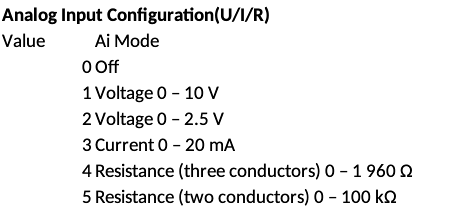
However, register 1024 always shows "0" for me, while the input rating shows the right voltage.
My code:union { uint16_t word[2]; uint32_t dword; float flt; } wert = 0; err = modbus_read_registers(connection, 1024 , 1, &wert.word[0]); printf("[read_ai] Wert: %d",wert.dword); // Now read the voltage: err = modbus_read_registers(connection, 3002 , 2, &wert.word[0]); printf("[read_ai] wert.flt: %5.2f",wert.flt);Output is:
[read_ai] Wert: 0
[read_ai] wert.flt: 3.00
So value 0 mean "disabled". But it still reads the voltage. Shouldn't it be at "1" for the default mode of measuring voltage?
/KNEBB
-
Hello @knebb,
what is your OS and firmware version? -
Neuron M103 (the old one, not the current) which is still running with Raspbian 10/ buster.
How do I get the information about the firmware?
(BTW: I tried to upgrade to latest Raspbian, but failed)
Hello! It looks like you're interested in this conversation, but you don't have an account yet.
Getting fed up of having to scroll through the same posts each visit? When you register for an account, you'll always come back to exactly where you were before, and choose to be notified of new replies (either via email, or push notification). You'll also be able to save bookmarks and upvote posts to show your appreciation to other community members.
With your input, this post could be even better 💗
Register Login