USB-to-RS485 and Power Meter ... can't get it to work
-
Hi
I have a UniPi 1.1 and a USB to RS485 Adapter.
With this i would like to meassure values from a SDM120-Modbus power meter.But i simply can't get it to work.
I tried it in Rexygen, and it was way easier.In Mervis i don't know where to start.
e.g. where should i put the "connection parameters" (/dev/ttyUSB0)Any help?
Thanks
-
Hi @dickesc,
I would suggest to take at our Connecting to Modbus slave tutorial. You can select USB1 - USB4 in the configuration of the ModbusRTU channel.Best regards,
Martin -
Thanks for the Link
So i have tried the following:
- add a channel
Protocol "Modbus"
Link Protocol "Serial"
Port Number "USB Port1"
Baud Rate "9600"
Data Bits "8"
Parity "None"
Stop Bits "One"- add a device
Device Address "1"
- add a group to the device
Starting Element "30001"
Quantity of Elements "6"- add a Data Point
Select the right group
Comm Value "BuiltIn"
ST Type "real"
MultiByte Length "4"-
Set Autogen
-
Build and deploy
When i debug it i get "Port initialization Failed (status 53)" i the Port Monitor.
In the Variable Browser i get "Communication Error" and a PLC Value of "0".So, what can i do next?
Thanks
-
Hi @dickesc,
did you connect the converter to the correct USB. This is the USB1: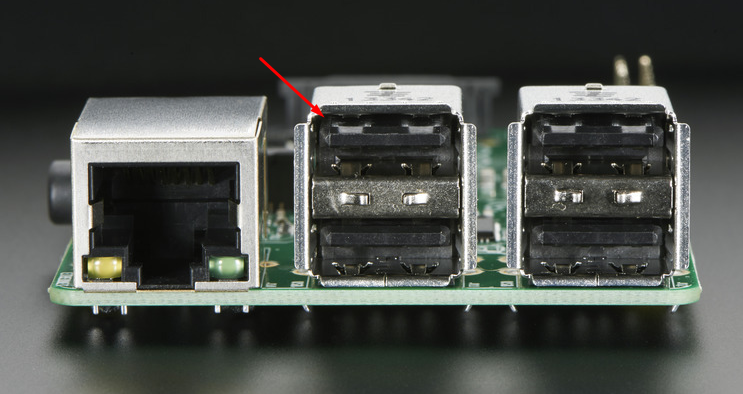
-
Hi
Yes, i have it connected to this port.
And i have tried all the other ports too. -
Hi
In the meantime i got my Neuron M203.
The UniPi was just for testing.With the Neuron i can "communicate" with the SDM120-Modbus, but i can get no values.
Can someone help me with the configuration for
- Modbus Group Parameters
- Comm. Value Mapped Type
- ST Type
- Data Offset
- MultiByte Lenght
The Modbus register map you can find here:
https://bg-etech.de/download/manual/SDM120C-Modbus-DE.pdf
http://www.eastroneurope.com/media/_system/tech_specs/3914/SDM120 PROTOCOL.pdfThanks

Hello! It looks like you're interested in this conversation, but you don't have an account yet.
Getting fed up of having to scroll through the same posts each visit? When you register for an account, you'll always come back to exactly where you were before, and choose to be notified of new replies (either via email, or push notification). You'll also be able to save bookmarks and upvote posts to show your appreciation to other community members.
With your input, this post could be even better 💗
Register Login