Neuron M503 Analog Inputs 4-20 mA
-
Hi,
I would like to ask about setting analog inputs to sensing current 4-20 mA. I found out in manual, that I have to set AI_mode to 3 (input group 2). I set it in FBD, but in senses still voltage. It was working fine, but I am not sure what happened and now it behave strange - for example now I can not hear Relay Outputs switching...

Is this way the best practice how to set AI to sense current?
Thanks
Dalibor -
Hi @dalibor
I think the best way for you would be to start using the new MervisIDE. It is still in development phase but the overall stability is good. And hopefully by the end of the week we will have the production ready version.So please:
- Download and flash the latest image from here: https://files.unipi.technology/s/public?path=%2FSoftware%2FMervis (the UniPi-Mervis-OS-2018-09-14_v1.7-BETA.zip)
- Download and install the latest MervisIDE from here: https://unipitechnology-my.sharepoint.com/:u:/g/personal/kudlacek_unipi_technology/EXZ-Oeoq2UFPkHbJ68Jj-sQB7N7iHxQpXJv3RLUgVk3psQ?e=aSd2IG
A lot of things changed, namely the HMI and even the usage of AO and AI (more simple and straightforward). We are working on the relevant tutorials as we speak and you can find them here: https://kb.unipi.technology/en:sw:01-mervis:06-tutorials
Unfortunatelly, the AO and AI tutorials are not finished and will be today or tommorow.As with the problem with non-responding ROs. We believe this is problem with I2C communication inside of the PLC and we released a new version of firmware. By using the image above, the new version of firmware will be flashed during the first start up. Please be patient, since the boot will be a couple of minutes instead of 30s as normal.
Hope this helps,
Martin -
Hi Martin,
thank you for quick reply. ROs works again...
Can I ask you for just a printscreen or hint, how to set an input to 4-20 mA in new version? Or if you have just a skeleton of AI tutorial....?
Thank you
Dalibor -
Hi @dalibor
changing the modes is done on the prototype of the device. Double click on the prototype in the Left panel, search for the AI, select the AI for which you want to change the mode and in the Properties panel change the Analog type parameter.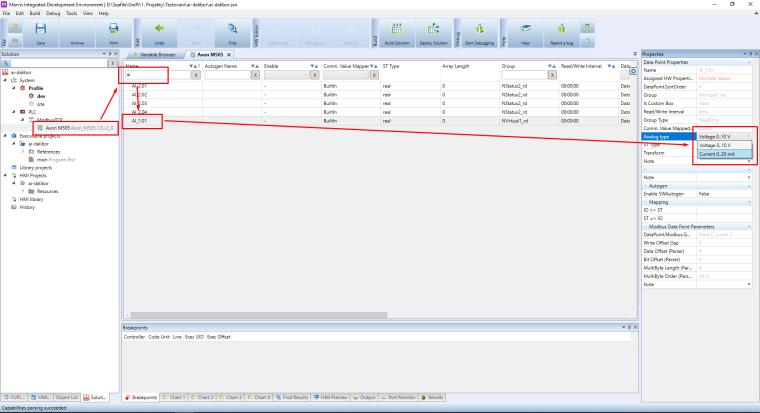
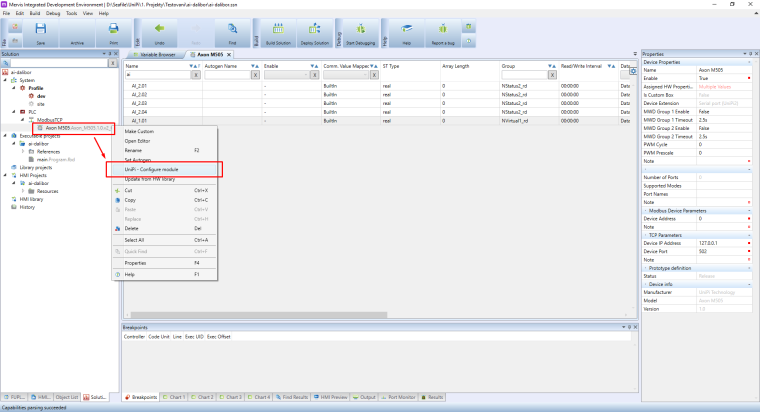
Then right click on the prototype and select Configure UniPi Module and proceed with subsequent dialogs.
Martin
-
Hi Martin,
thank you for help. Unfortunately I have now another issue...is it possible that BD2 Pulse Generator is not working in more complicated projects? It was working fine with two blocks (FBD), but now it is just on True and not switching...
It is still like this:

Thank you
Dalibor -
Hi @dalibor ,
that's odd, it should definitely work. Can you share the project with me on [email protected]?Thanks,
Martin

Hello! It looks like you're interested in this conversation, but you don't have an account yet.
Getting fed up of having to scroll through the same posts each visit? When you register for an account, you'll always come back to exactly where you were before, and choose to be notified of new replies (either via email, or push notification). You'll also be able to save bookmarks and upvote posts to show your appreciation to other community members.
With your input, this post could be even better 💗
Register Login