Similar error to topic/553/evok-do-not-read-device-configuration
-
Which UniPi Neuron model do you have? It looks like your EEPROM is misformatted since it shows M613, which was only a preproduction model. This is likely entirely on us.
Luckily it should be easy to fix, all you need to do is edit one file. It is unfortunately necessary to know the model beforehand, as the contents need to reflect your actual model.
Edit: Based on further information received by email, it appears that you have the DALI-compatible model M603 which has an old code in the EEPROM. You should be able to fix it by changing the second line of the /etc/hw_definitions/M60x.yaml file from "type: M60" to "type: M61".
Please do report back with the results if you try the above change. Apologies for the inconvenience.
-
Hi Tomas
I have progressed a bit further and now have digital, analog, uleds, serail and watchdog showing up, but still the board on spi0.3 giving an error. Is that the light channel board?
kern.log
Feb 20 16:17:03 unipi-stretch kernel: [ 3.792939] neuronspi: loading out-of-tree module taints kernel.
Feb 20 16:17:03 unipi-stretch kernel: [ 3.808008] NEURONSPI: Neuronspi Probe Started
Feb 20 16:17:03 unipi-stretch kernel: [ 3.810140] NEURONSPI: Probe did not detect a valid Neuron device on CS 3
Feb 20 16:17:03 unipi-stretch kernel: [ 3.810187] neuronspi: probe of spi0.3 failed with error -5
Feb 20 16:17:03 unipi-stretch kernel: [ 3.810655] NEURONSPI: Neuronspi Probe Started
Feb 20 16:17:03 unipi-stretch kernel: [ 3.815237] NEURONSPI: Probe detected Neuron Board 1 v5.4 on CS 2, Uart count: 0 - reg1000: 504, reg1001: 0, reg1002: 0, reg1003: e00, reg1004: e00
Feb 20 16:17:03 unipi-stretch kernel: [ 3.815249] NEURONSPI: Neuron device on CS 2 uses SPI communication freq. 12000000 Mhz
Feb 20 16:17:03 unipi-stretch kernel: [ 3.816451] NEURONSPI: Neuronspi Probe Started
Feb 20 16:17:03 unipi-stretch kernel: [ 3.824883] NEURONSPI: Probe detected Neuron Board 0 v5.6 on CS 1, Uart count: 1 - reg1000: 506, reg1001: 404, reg1002: 311, reg1003: 10, reg1004: 10
Feb 20 16:17:03 unipi-stretch kernel: [ 3.824903] NEURONSPI: Neuron device on CS 1 uses SPI communication freq. 12000000 Mhz
Feb 20 16:17:03 unipi-stretch kernel: [ 3.824913] NEURONSPI: LED model detected at CS: 1
Feb 20 16:17:03 unipi-stretch kernel: [ 3.826438] NEURONSPI: Added UART port 0
Feb 20 16:17:03 unipi-stretch kernel: [ 3.831223] NEURONSPI: SPI Driver Registered, Major Version: Master Version 1.0:20:12:2017evok.py from github
evok.py debug.
[I 180220 19:11:21 config:63] eprom: UniPi Neuron M613 version: 1.0 serial: 0x2
[I 180220 19:11:21 evok:1628] Starting using config file /etc/evok.conf
[I 180220 19:11:22 config:75] YAML Definition loaded: M60x.yaml, type: 3, definition count 0
[I 180220 19:11:22 config:75] YAML Definition loaded: evok-alias.yaml, type: 2, definition count 0
[I 180220 19:11:22 evok:1692] HTTP server listening on port: 8080
[I 180220 19:11:22 modbusclient_tornado:122] SPI client started
[I 180220 19:11:22 neuron:157] Reading SPI boards
[D 180220 19:11:22 owclient:377] Entering 1wire loop
[I 180220 19:11:22 neuron:172] No board on SPI 3 -
The board 3 being empty should be fine, it's empty on the M models and only filled on the L models. Can you not see the light channel devices in the web interface? There may be some other issues caused by recent updates to the image if so.
-
Hello is there any solution? I have downloaded and deployed the lastest image from link UniPian-Neuron-OS-2018-02-16.img.zip. And it is not running correctly. On web page I can see only
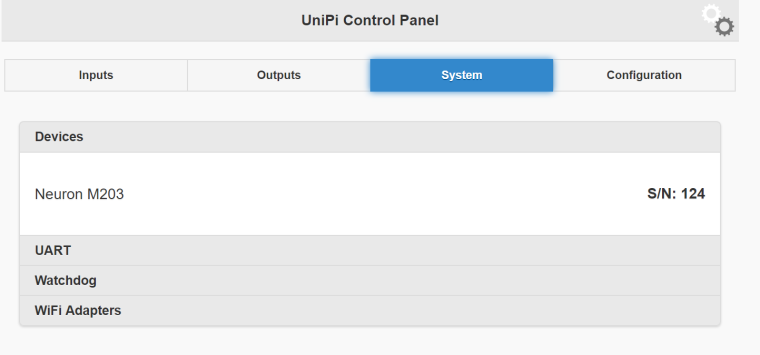
and in error.log is
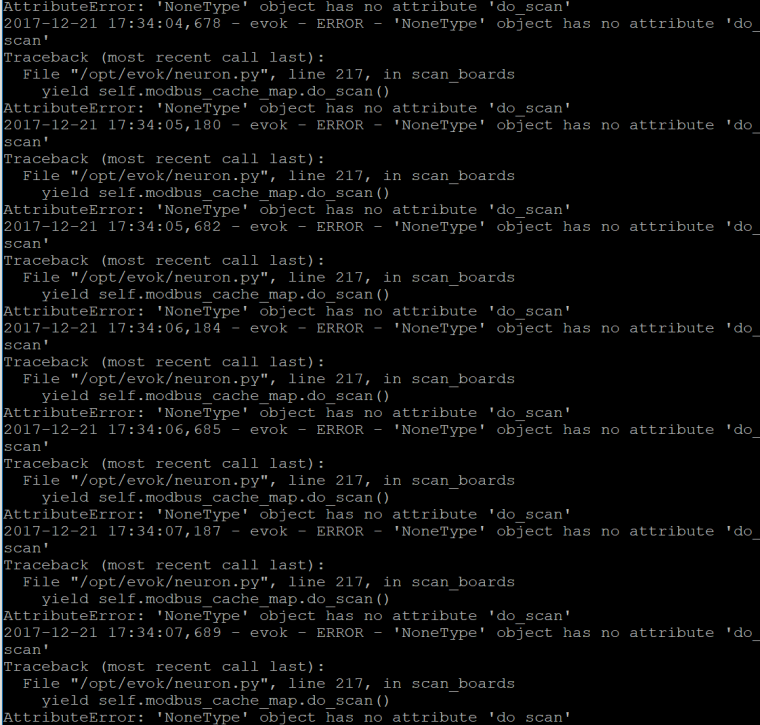
What can I do?
-
That looks like an unrelated error. Could you post the entire output from "ps -fax", "lsmod" and running evok manually through "systemctl stop evok" and "python /opt/evok/evok.py"?
The error message in general appears when the linux interface cannot connect to the rest of the device. In the development branch this has been changed slightly to be better reflected in the message.
You could also try a clean install of the latest release (02-26) and see if the issue goes away.
-
@tomas_knot If it is unrelated error, why the is no handler to print related error or at least change the error message.
Just to confirm, fresh install of the latest release do you mean:
1/ download and install latest raspbian
2/ run in terminal
sudo su
wget https://github.com/UniPiTechnology/evok/archive/master.zip
unzip master.zip
cd evok-master
bash install-evok.sh -
My Neuron don't have an internet connection. Is it possible to install it on normal RaspberryPi with internet connection and then move the sd card to Neuron. Or during instalation is made some hw recognition and base on that some adjustment and configuration?
-
Try taking out the power first, and plugging it back in. The device tries to flash updated firmware on the first run on UniPian.
I can confirm M203 behaves as this with UniPian 2-16 - on first run no devices come up with the error message you describe in the log; waiting cca a minute and then unplugging and plugging back in the device causes it to behave correctly.
The error message is the same because the error is principally the same - but it can have a lot of underlying causes.
-
@tomas_knot
Sorry for the delay.
I have "Unknown Device Type" under configuration menu.
This lists 2.01 2.02 2.03 2.04 twice and then duplicates a set of 4 entries to the list every time I click submit on any of the configuration dialogs.
The underlying link for the 2.01 -2.04 is /#light_channel
-
Progress. The file main.js has many case statements to to dali_channel, I changed to light_channel and see sliders. I also uncommented the dali list divider in index.html.
-
Can you confirm whether the UniPi does or doesn't supply Dali bus power.
-
UniPi doesn't supply DALi bus power.
As to the DALI/light bus dychotomy - I believe that this has been corrected in the Master version of Evok on Github, but has yet to percolate through to the release versions.
Hello! It looks like you're interested in this conversation, but you don't have an account yet.
Getting fed up of having to scroll through the same posts each visit? When you register for an account, you'll always come back to exactly where you were before, and choose to be notified of new replies (either via email, or push notification). You'll also be able to save bookmarks and upvote posts to show your appreciation to other community members.
With your input, this post could be even better 💗
Register Login